OpenAPI Diff: Detect Breaking Changes Between API Versions
Compare two OpenAPI specs and catch breaking changes before release: removed fields, narrowed enums, changed types. Free diff tool, no signup, CI-ready.
Published
Reading time
7 min read
Topics covered
Why read this
This guide helps you catch breaking API changes before they reach production by comparing two OpenAPI versions side by side.
- Learn how to compare OpenAPI specs and spot breaking changes quickly.
- See a practical OpenAPI diff workflow using ApiNotes.
- Turn a diff into release notes your API consumers can actually read.
You shipped a new API version and a mobile app suddenly starts failing on a field that used to exist. The endpoint path is the same, the status code is still 200, and nothing looked obviously wrong in code review. But somewhere between two OpenAPI files, a "small" contract change became a production incident.
This is exactly why teams need an OpenAPI diff workflow. If you compare OpenAPI specs before release, you can detect breaking changes early, decide whether the release is safe, and avoid silent regressions in SDKs and client apps. Instead of guessing what changed, you get a clear contract-level diff.
⚠️ Looking for Optic? Optic's repository was archived on January 12, 2026. APInotes provides the same breaking-change detection, actively maintained. Use the OpenAPI Diff tool.
# Why OpenAPI Diff Matters Before Every Release
When APIs evolve, even tiny spec edits can have a big downstream impact. Removing a required property, narrowing an enum, changing a response schema, or modifying authentication requirements can break existing integrations immediately.
The challenge is that these changes are hard to spot manually in large YAML or JSON files. Line-by-line Git diffs show text changes, but they do not tell you semantic impact. An OpenAPI diff tool does.
Common changes that should be flagged as potentially breaking:
- Removing endpoints or operations
- Renaming or removing request parameters
- Changing parameter types or required flags
- Removing response fields used by clients
- Tightening schema constraints in ways existing payloads no longer satisfy
- Changing auth requirements for an existing endpoint
# The Practical Solution: Compare OpenAPI Specs with ApiNotes Diff
If your query is "openapi diff" or "compare openapi specs," the practical workflow is simple:
- Upload the previous OpenAPI spec
- Upload the new OpenAPI spec
- Run the diff and inspect breaking changes first
- Fix, version, or document changes before shipping
ApiNotes OpenAPI Diff is built for exactly this release check. It highlights what changed and helps you identify whether the change is backward compatible.
# Step 1: Upload Old and New Specs
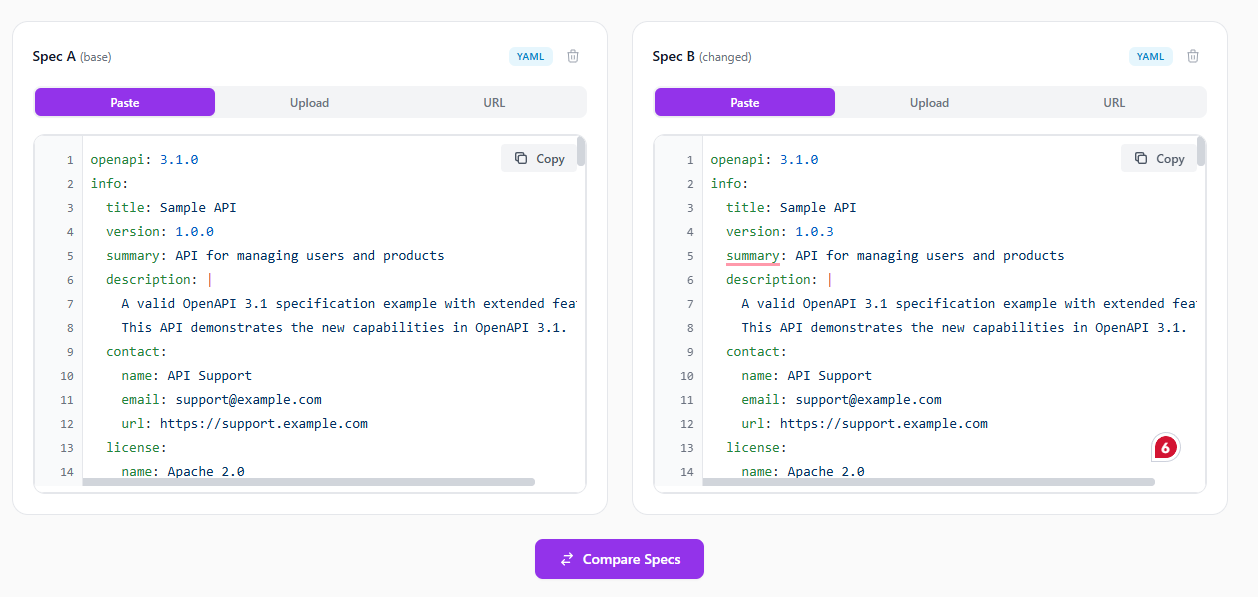
Open ApiNotes OpenAPI Diff and add two specs: your baseline version and your proposed release version. You can paste JSON/YAML or upload files.
If either file has not been checked recently, run it through the OpenAPI validator first. A diff against a spec that is itself invalid produces noisy results, because unresolved $refs and malformed schemas show up as phantom changes.
# Step 2: Run the Diff and Review Breaking Changes
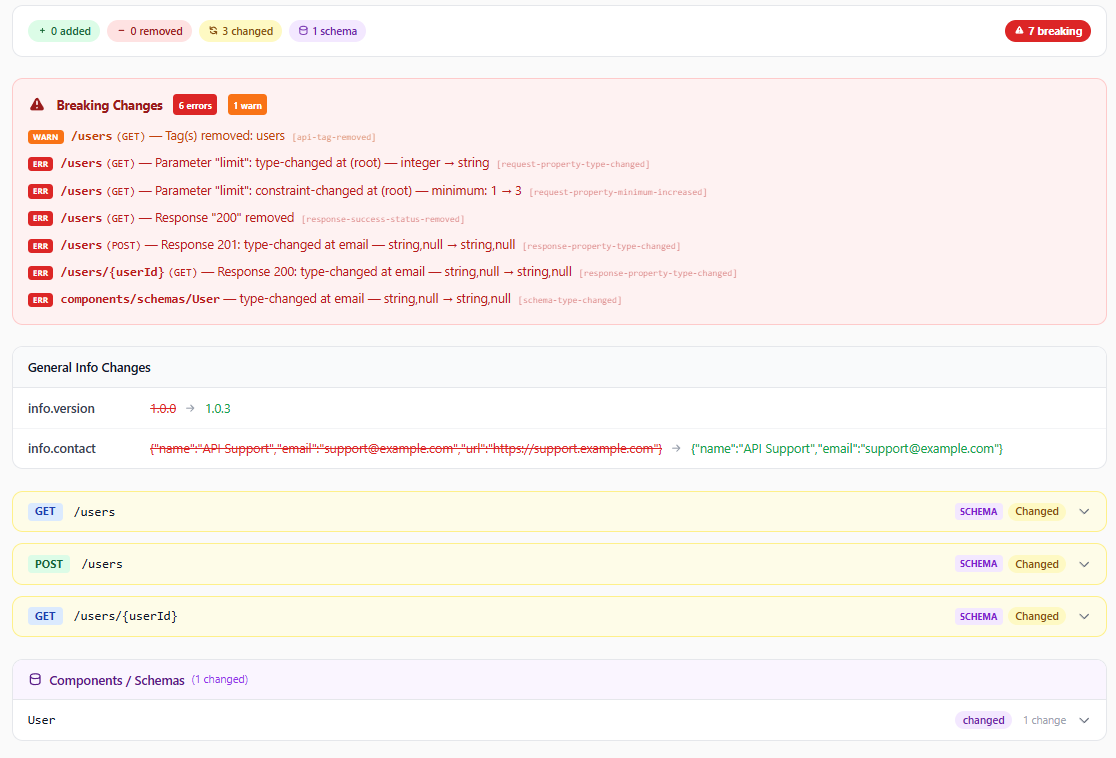
Once both specs are loaded, run the comparison. ApiNotes groups changes by type so you can quickly focus on high-risk changes first.
This is where you should prioritize:
- Removed operations
- Added required request fields
- Removed response properties
- Type or format changes that invalidate existing clients
# Step 3: Resolve the Risk Before Release
At this stage, decide whether to:
- Revert a breaking change
- Release a new major API version
- Add compatibility fallback fields
- Update documentation and migration notes
The goal is not just to detect differences. The goal is to prevent accidental contract breaks from slipping into production.
# What to Treat as High-Risk in an OpenAPI Diff
Not every diff is dangerous. But these patterns usually deserve extra attention in code review and QA:
# 1. Required Field Changes
Changing an optional field to required often breaks existing clients that do not send it.
# 2. Enum Narrowing
If allowed values shrink, older clients might send now-invalid values.
# 3. Schema Type Changes
Moving from integer to string, or changing array/object structures, can break deserialization and validation.
# 4. Response Shape Removals
Clients often rely on specific response fields, even if undocumented in app code. Removing fields can break UI flows.
# 5. Auth or Security Contract Changes
Adding new auth requirements to an existing endpoint is a functional break for current consumers.
# Where This Fits in Your Delivery Pipeline
OpenAPI diff works best as a release gate:
- Generate or update your new OpenAPI spec
- Compare it to the last released spec
- Resolve breaking changes intentionally
- Only then publish docs, regenerate SDKs, and deploy
This gives teams a simple rule: no release without contract diff review.
# Turn the Diff Into Release Notes
A diff tells you what changed. Your consumers need the same information in a form they can read, and writing that by hand after every release is exactly the step teams skip.
The API Changelog Generator closes that gap. Paste the same two spec versions you just compared and it produces human-readable release notes, grouped Keep a Changelog style — breaking changes first, then added, removed, deprecated, and changed endpoints. From there you can:
- Download a
CHANGELOG.mdthat drops straight into your repo - Export structured JSON to feed a release pipeline
- Publish live HTML documentation with the changelog already attached
It runs on the same engine as the diff above, so the breaking-change calls are identical — you are just getting them in prose instead of a comparison table.
# See What Good API Changelogs Look Like
If you want to see this pattern applied at scale, browse the API Changelog Directory. It tracks 60+ popular public APIs, rebuilding each changelog every day from the vendor's official OpenAPI specification and flagging breaking changes automatically:
- Slack Web API changelog
- OpenAI API changelog
- Twilio REST API changelog
- Discord HTTP API changelog
- Plaid API changelog
These are useful in two ways. If you consume one of these APIs, you can watch it and get an email before a silent change breaks your integration. If you publish an API, they are a good reference for the level of detail your own consumers expect — and a preview of what your project's changelog looks like once ApiNotes generates it for you on every spec upload.
# Automate This in Pull Requests with the GitHub Action
If you want this workflow to run automatically on every PR, use the ApiNotes OpenAPI Validate & Diff GitHub Action.
- It validates OpenAPI specs in CI
- It compares PR changes against the base branch
- It posts a PR comment with validation and diff results
- It can block merges when specs are invalid or breaking changes are detected
Read the full setup guide here: OpenAPI GitHub Action guide
Install from GitHub Marketplace
# Try It Now
Use ApiNotes OpenAPI Diff to compare specs and catch breaking changes before users do.
# ApiNotes vs Other OpenAPI Diff Options
| Option | Best for | Setup required | Breaking-change visibility | Team-friendly UI | Tradeoffs |
|---|---|---|---|---|---|
| ApiNotes OpenAPI Diff | Fast browser-based spec comparison before release | None | Clear, categorized output | ✅ Yes | Less scriptable than CLI-first workflows |
| openapi-diff CLI | CI/CD automation and terminal pipelines | Medium | Good machine-readable output | ⚠️ Limited | Requires setup and pipeline wiring |
| Swagger/OpenAPI text diff in Git | Quick file-level review | None | ❌ Semantic impact is unclear | ⚠️ Limited | Easy to miss breaking contract changes |
| Redocly + custom rules | Teams with advanced API governance | High | Strong when configured | ⚠️ Depends on setup | More initial effort and maintenance |
| Postman/manual review | Exploratory endpoint validation | Medium | ⚠️ Mostly manual discovery | ✅ Yes | Slow for full contract-level change detection |