How to Validate an OpenAPI Spec: A Step-by-Step Guide
A practical guide to validating an OpenAPI spec — what validation actually checks, how to read the errors, and how to confirm your spec survives OpenAPI Generator and Azure API Management before you ship it.
Published
Reading time
10 min read
Topics covered
Why read this
Learn how to validate an OpenAPI spec properly — not just 'is it valid YAML', but 'will the tools that consume it actually work'.
- Understand the three layers of validation: syntax, specification, and tool compatibility.
- Walk through validating a spec end to end in the free ApiNotes validator.
- See what the new OpenAPI Generator and Azure API Management checks catch before you publish.
"Is my OpenAPI spec valid?" is a deceptively simple question, because it has three different answers depending on who is asking.
Your YAML parser wants to know whether the file parses. The OpenAPI specification wants to know whether the document obeys the schema for its version. And the tool that actually consumes your spec — a code generator, an API gateway, a docs renderer — wants to know something else entirely: can I do my job with this?
A spec can pass the first two and still fail the third. That's the gap this guide is about. Below is a complete workflow for validating an OpenAPI spec, from "does it parse" all the way to "will OpenAPI Generator and Azure API Management accept it", using the free ApiNotes OpenAPI validator.
# The Three Layers of OpenAPI Validation
Before touching a tool, it helps to know what you're checking for. Validation isn't one thing — it's three, and they fail differently.
# Layer 1: Syntax
Does the file parse as JSON or YAML at all? This is the cheapest check and the most common early failure. Tabs where spaces belong, an unquoted * at the start of a value, a duplicated key, a missing closing brace. Your editor usually catches these, but a spec assembled by a build step or exported from another tool often doesn't get that treatment.
# Layer 2: The OpenAPI specification
Does the document obey the rules for its declared version? This is where most validators stop, and it covers a lot:
- Required fields —
info.title,info.version,openapiorswagger - Every
$refresolves to something that exists - Schemas are well-formed: no
type: arraywithoutitems, no danglingdiscriminatormapping - Examples actually match the schema they're attached to
- Version-specific rules —
nullableis a 3.0 keyword and is gone in 3.1, where you writetype: [string, "null"]instead
Layer 2 failures are what most people mean by "invalid spec". They're objective: the document either conforms or it doesn't.
# Layer 3: Tool compatibility
This is the layer everyone gets bitten by, because a spec here is valid — it just doesn't work. The specification permits things that real tools don't implement, don't implement the same way, or quietly rewrite:
- A schema named
user-profileand another namedUser Profileare both legal. OpenAPI Generator collapses both to a class calledUserProfile, and one silently overwrites the other. - A
$refto./schemas/pet.yamlis legal and idiomatic. Azure API Management cannot resolve it — external file references simply aren't supported on import. - A recursive schema (a
Commentwith a list ofCommentreplies) is legal and common. APIM rejects recursive definitions outright.
None of these are errors. They're all "valid". And every one of them produces a broken client SDK or a mangled gateway import.
The rule of thumb: Layer 2 tells you whether the document is correct. Layer 3 tells you whether it's usable. You need both.
# Step 1: Load Your Spec Into the Validator
Open the ApiNotes OpenAPI validator. It's free, requires no account, and supports OpenAPI 3.2, 3.1, 3.0, and Swagger 2.0 in both JSON and YAML.
There are three ways to get your spec in, and they're on tabs above the editor:
- Paste — drop YAML or JSON straight into the editor. The format is auto-detected and shown as a badge.
- Upload — drag a
.yaml,.yml, or.jsonfile onto the drop zone, or click to browse. - URL — point it at a publicly reachable spec URL and hit Fetch. The document is fetched and validated without being stored.
If you just want to see how it behaves, there's a Load Petstore sample link under the editor.
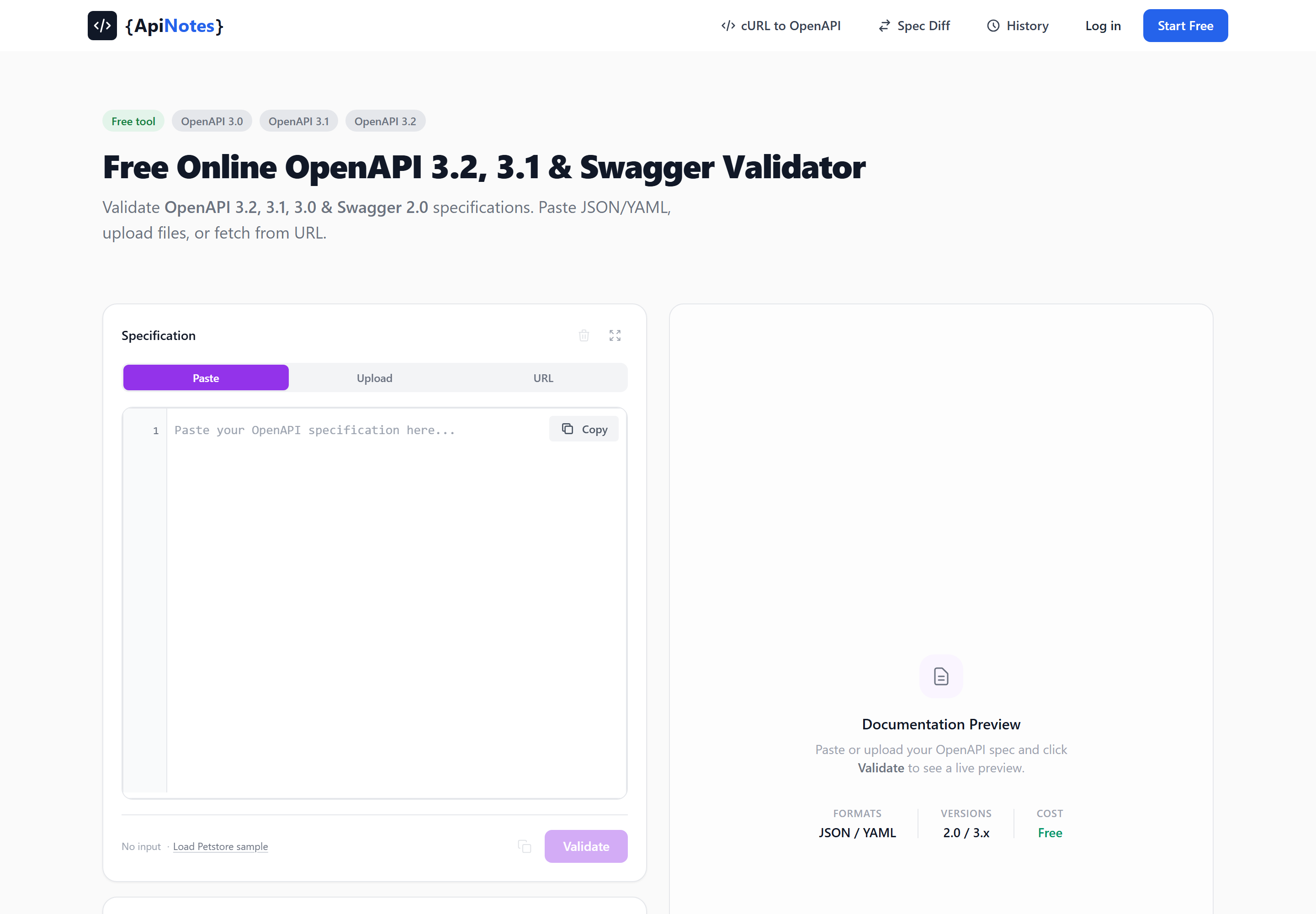
Then click Validate. Everything else in this guide happens on the results panel that appears on the right.
# Step 2: Read the Errors — and Actually Fix Them
If the spec fails, you get a count at the top (7 Errors Found) and a scrollable list below it. Each entry is designed so you don't have to go hunting:
- A line number. Click any error and the editor scrolls to that line and highlights it. This is the part that saves the most time — validator output that only gives you a JSON pointer means you're still doing the search yourself.
- A JSON path, like
paths./pets/{petId}.get.responses.200.content, so you know exactly which node is wrong. - The failing keyword —
required,type,additionalProperties— which tells you the shape of the problem at a glance. - A fix suggestion for the common cases, written as the concrete edit to make rather than a restatement of the error.
At the bottom you get a summary strip that groups errors by keyword. If you see 12 Required and 2 Type, you know you're looking at one structural mistake repeated a dozen times, not fourteen separate problems — usually a copy-pasted response block missing the same field everywhere.
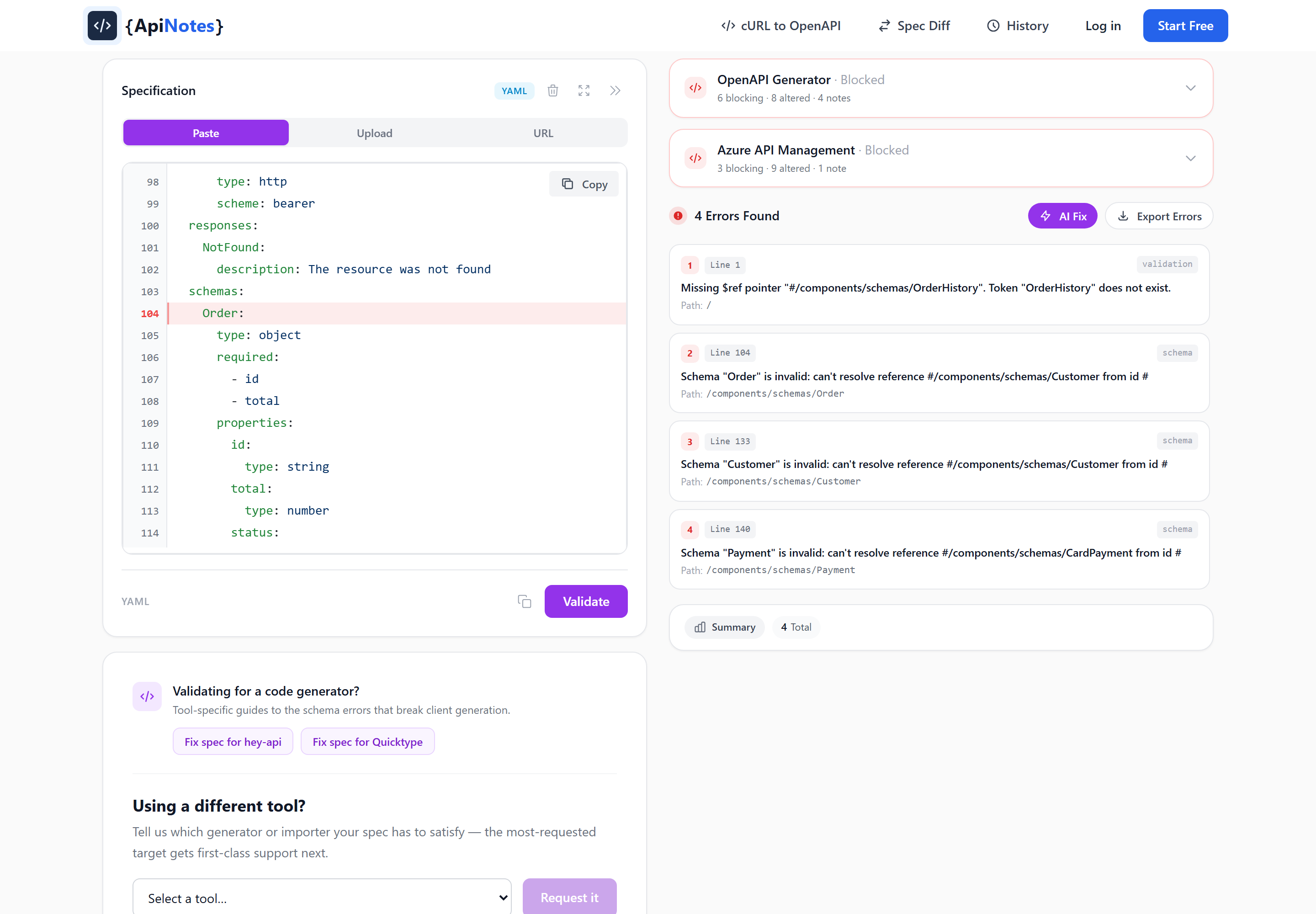
Validation is iterative. Fix, re-validate, repeat. Because the editor and the error list sit side by side, you're not context-switching between a terminal and a file — the loop is fast enough that you can work through twenty errors without losing your place.
If you'd rather hand the errors to someone else — or to a ticket — the Export Errors button gives you a Markdown report you can download, plus a shareable link to the result. And when a spec is genuinely tangled, the AI Fix button ($3.99, one-time) rewrites the document against the reported errors and shows you the corrected version.
# Step 3: Check Tool Compatibility — the New Validators
Here's where the validator does something most others don't.
Once your spec parses and has a version, ApiNotes runs a second, independent pass: a static analysis of your document against the documented restrictions and known behaviour of the tools that will consume it. Two targets ship today, and the results appear as expandable cards above the error list.
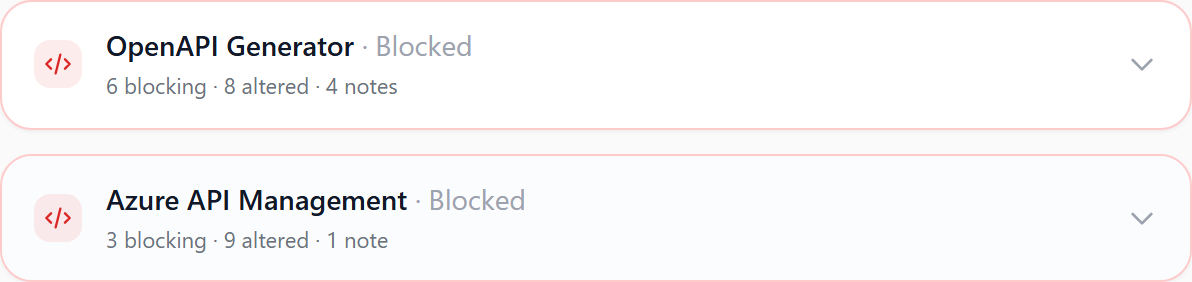
Each issue is graded by what it actually does to you:
| Badge | Meaning |
|---|---|
| Blocks | The tool fails, or produces output that won't compile / won't route. |
| Alters | The tool succeeds but silently changes, renames, or drops part of your API. |
| Note | Worth knowing, but nothing breaks. |
That distinction matters more than a severity number. "Alters" is the dangerous category — it's the class of problem that ships to production because nothing ever went red.
# The OpenAPI Generator validator
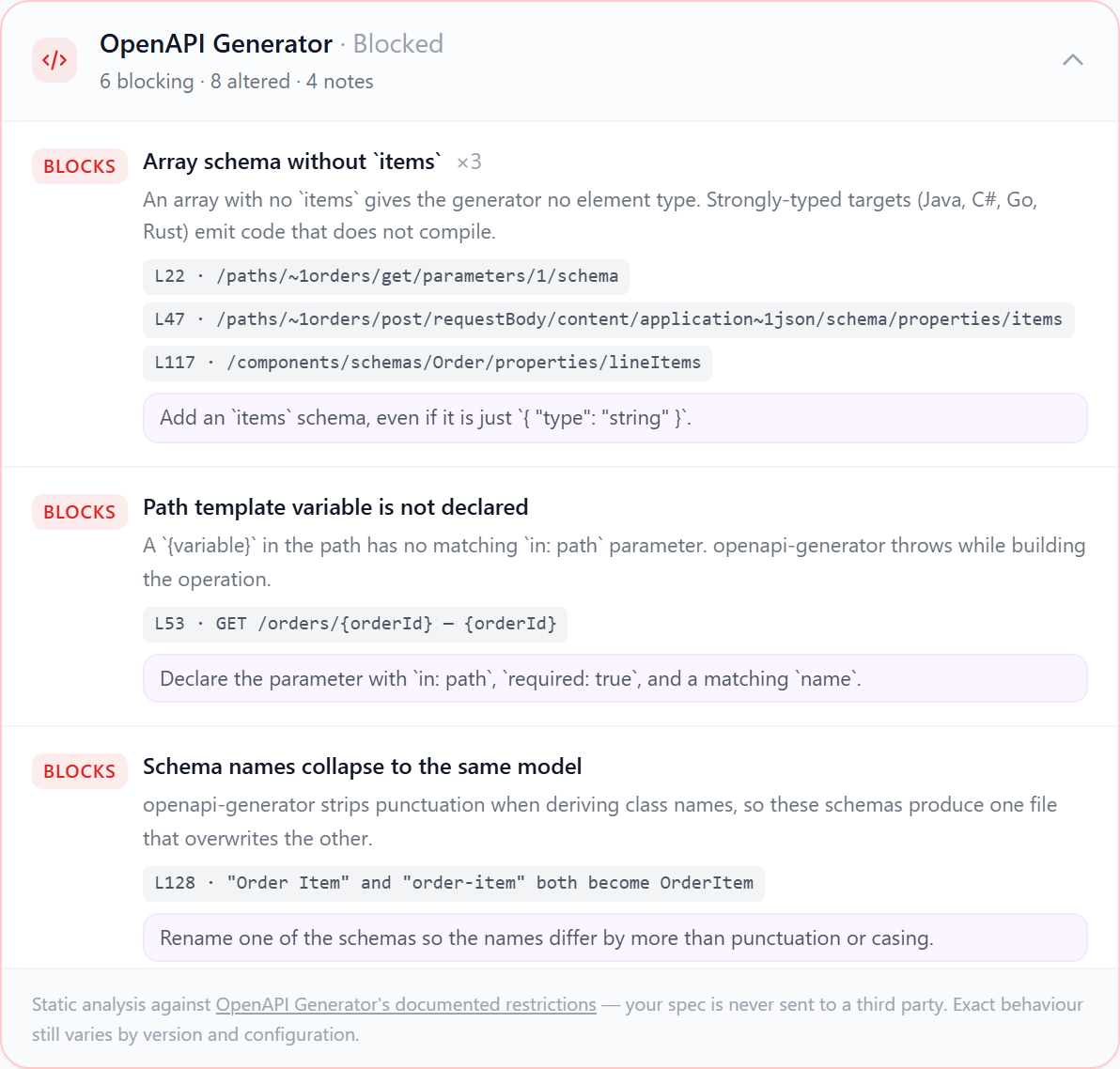
OpenAPI Generator is the most widely used way to turn a spec into client SDKs and server stubs, and it's opinionated in ways the specification never mentions. The ApiNotes checks model the rules the generator itself runs — the validations in org.openapitools.codegen.validations.oas plus the hard failures in its DefaultGenerator — so you get the verdict without installing Java or uploading your spec to a third party.
What it catches, with examples:
Blocking:
- Version support. OpenAPI 3.2 isn't supported by the generator at all; the document is rejected before it's read. OpenAPI 3.1 needs the 7.x line — 5.x and 6.x fail to parse it.
- Model name collisions.
pet-statusandPet Statusboth becomePetStatus. One file overwrites the other and you lose a model without a warning. - Arrays without
items. Strongly-typed targets (Java, C#, Go, Rust) emit code that doesn't compile. oneOfwith siblingproperties. The generator drops the siblings, so those fields never reach your model.- Undeclared path template variables — a
{petId}in the path with no matchingin: pathparameter throws while the operation is built. - A request body on GET or HEAD. Rejected outright, or the payload is silently lost.
Altering your output:
- Missing
operationId→ method names get derived from the path and verb, giving youpathsPetsIdGet, which changes every time the path does. - Duplicate
operationId→ the first survives; the rest become<id>_0,<id>_1. - No tags on an operation → everything lands in one giant
DefaultApiclass instead of being split per resource. - Inline object schemas → machine-named models like
CreatePet201Responsethat churn on every rename. oneOfwithout a discriminator → the generator can't pick a branch at deserialization time; Java and C# emit a trial-and-error wrapper, other targets fall back to a plain object.- Reserved words. A property named
class,type, ordefaultgets escaped to_class/varDefault, so the generated field no longer matches the wire name. The rule checks against the union of reserved words across Java, C#, Python, Go, TypeScript, and PHP.
# The Azure API Management validator
The APIM checks are different in kind: they aren't inferred from behaviour, they come straight from Microsoft's documented API import restrictions. If you've ever imported a spec into APIM and found half your definitions missing, this is the list you needed.
Blocking:
- External
$refs. APIM can't resolve references to other files — everything must be local to the document. If your spec is split across files, bundle it first. - Recursive schemas. Definitions that reference themselves, directly or through a chain, aren't supported.
- YAML Swagger 2.0. APIM's 2.0 support is JSON-only. A 2.0 YAML document cannot be imported at all.
- Version ceiling. 2.0, 3.0.x up to 3.0.3, and 3.1 (import only). A
3.0.4document is rejected. - URLs over 128 characters, and the 4 MB inline import limit.
- Parameter names that repeat across the URL template. OpenAPI only requires uniqueness per location, so a path
{id}and a queryidare both legal — APIM discriminates operations by path and query, so this collides.
Altering your import:
- Security definitions are ignored entirely. Your imported API is not protected by whatever the spec declares. This is the one that surprises people most.
- Components members not processed:
responses,parameters,examples,requestBodies,headers,securitySchemes,links,callbacks. - Operation fields dropped:
externalDocs,callbacks,security,servers,deprecated. - Required query parameters become required template parameters by default, changing the operation URL.
- No HTTPS server URL → the web service URL imports empty and the API can't route until you set it by hand.
- Missing
operationId→ APIM derives the resource name from method and path. On re-import, operations are matched by that name — so unmatched operations get deleted and recreated, taking their policies with them. - Cookie parameters, TRACE operations, path-level
servers, and non-default query serialization are all dropped or ignored.
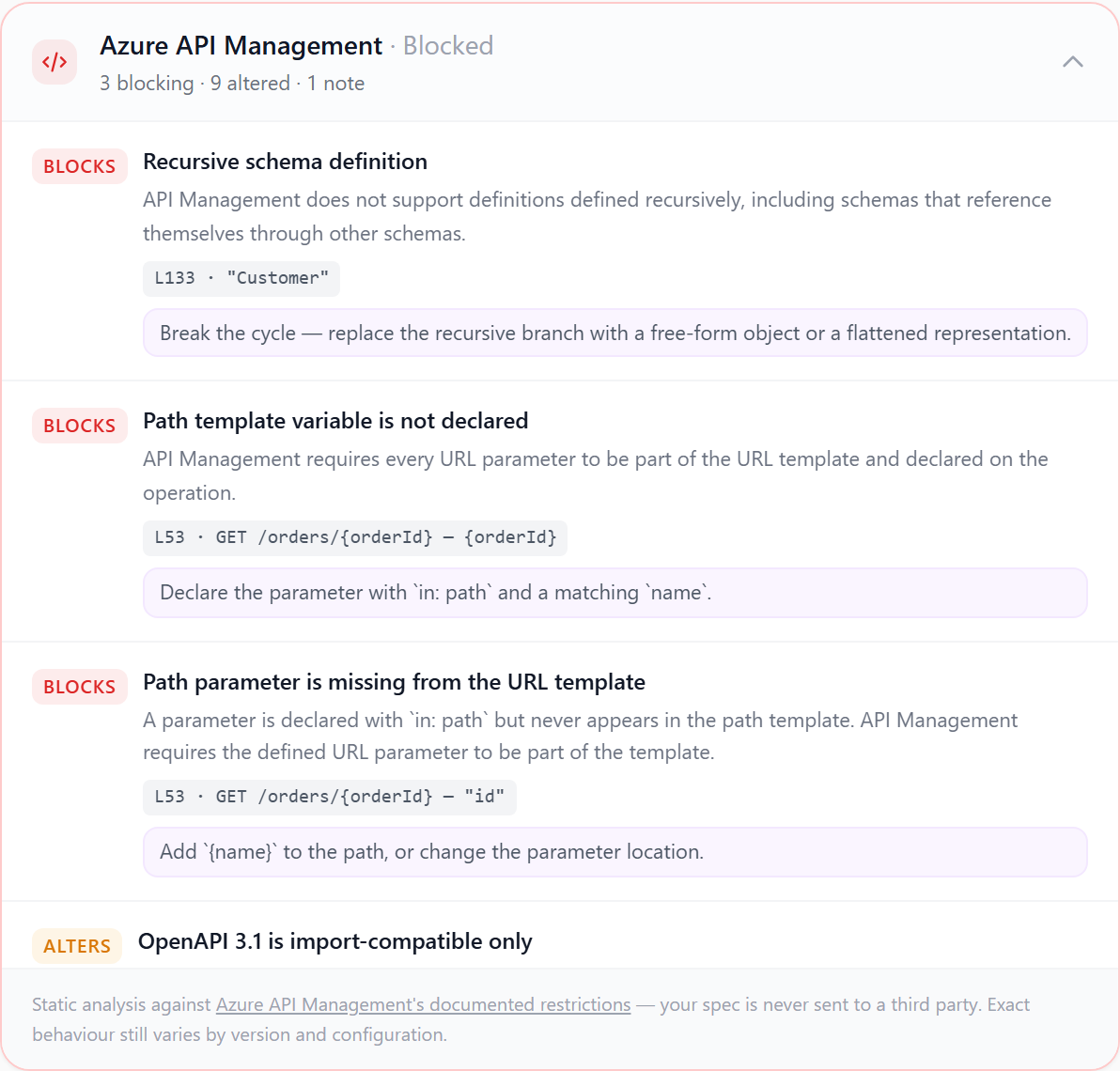
Both analyses are static and local to our backend — your spec is never sent to OpenAPI Generator, to Azure, or to any third party. And because they're heuristics modelling documented behaviour, exact results still vary by tool version and configuration. Treat a clean report as "no known problems", not as a guarantee.
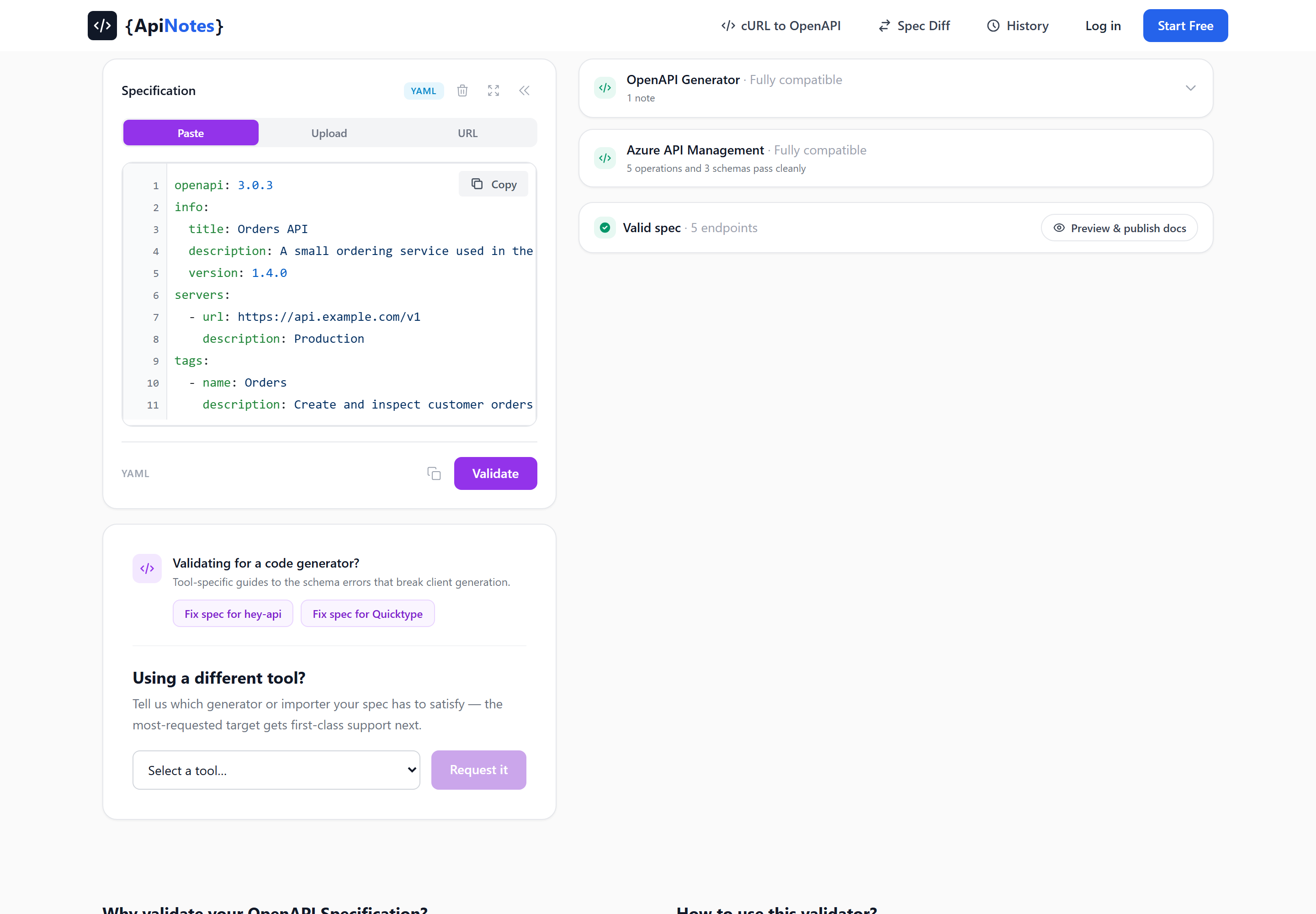
Missing the tool you use? There's a vote box under the editor for requesting a target, and there are already dedicated fix guides for hey-api and Quicktype.
# Step 4: Confirm It Renders
A spec can be valid, generator-safe, and still describe an API nobody can read. Once your spec passes, the validator shows a Valid spec confirmation with the endpoint count, and a Preview & publish docs button that renders the document as real documentation on a temporary URL (live for 48 hours).
This is a genuinely useful last check. Rendered docs make missing descriptions, empty summaries, and unhelpful example payloads obvious in a way that reading YAML never does.
# Step 5: Make It Automatic
Validating by hand works once. It does not work as a habit, and a spec that was valid on Tuesday is one merged PR away from not being.
Wire it into CI with the ApiNotes GitHub Action so every pull request that touches the spec gets checked:
name: Validate OpenAPI

on:
  pull_request:
    paths:
      - 'openapi.yaml'

jobs:
  validate:
    runs-on: ubuntu-latest
    steps:
      - uses: actions/checkout@v4
        with:
          fetch-depth: 0

      - uses: apinotes/[email protected]
        with:
          spec-path: 'openapi.yaml'
The fetch-depth: 0 matters — it gives the action the history it needs to diff your spec against the base branch and report what changed, not just whether the file is valid. Private repositories need an api-key input as well; there's a full walkthrough on the GitHub Action page.
# A Validation Checklist
Print this, or just work down it:
- Does it parse? JSON or YAML, no duplicate keys.
- Does it declare a version?
openapi: 3.1.0orswagger: "2.0". Without it, nothing else can run. - Does it pass specification validation? Zero errors in the validator, not "only warnings left".
- Do all
$refs resolve locally? External file refs are fine for humans and fatal for several tools. - Does every operation have a unique, hand-written
operationId? This single habit fixes generator method names, APIM resource names, and policy retention on re-import. - Is every operation tagged? Otherwise your generated SDK is one flat
DefaultApi. - Does every array have
items, and everyoneOfa discriminator? - Does the compatibility report for your actual toolchain show zero "Blocks"? And have you read the "Alters" list rather than skimming past it?
- Do the rendered docs look right?
- Is all of the above running in CI?
# Wrapping Up
Most OpenAPI validators answer Layer 2 and stop: is this document schema-correct? That's necessary, and it's not sufficient. The specs that cost teams the most time are the ones that validate perfectly and then produce a client SDK with two models fused into one, or an APIM import with the security definitions quietly stripped out.
Checking all three layers takes about a minute in the ApiNotes validator — paste, validate, read the compatibility cards, fix, re-validate. It's free, no account needed, and your spec isn't stored unless you choose to publish it.
If you want to go deeper on the individual errors, we analysed 7,039 real OpenAPI spec errors and wrote up the most common ones with broken and fixed snippets side by side.