How to Monitor Third-Party API Changes (Without Reading Release Notes)
Third-party APIs change without telling you. Learn how to monitor API changes automatically by diffing OpenAPI specs, and get emailed before a change breaks your integration.
Published
Reading time
9 min read
Topics covered
Why read this
This guide shows you how to find out that a third-party API changed before your users do, instead of after an incident.
- Understand why vendor release notes and status pages miss most contract changes.
- Compare the four common ways teams track third-party API changes.
- Set up email alerts for an API you depend on in about a minute.
Your integration worked on Friday. On Monday it returns a validation error on a field you have never touched. Nobody deployed anything. The vendor's status page is green, their changelog has no entry for last week, and their Twitter account is talking about a conference.
Somewhere in between, a third-party API changed its contract and told nobody.
This is the ordinary failure mode of depending on someone else's API, and it is why "read the release notes" is not a monitoring strategy. This guide covers how to monitor API changes automatically — what actually breaks, why announcements miss it, and how to get an email the day a spec changes instead of a bug report a week later.
# Why Release Notes Are Not Enough
Vendor changelogs are written by humans with a marketing calendar. Your integration breaks because of things those humans did not consider newsworthy. Four specific gaps:
1. Most contract changes are never announced. Adding an enum value, tightening a maxLength, making an optional response field disappear for certain accounts — none of that reaches a release-notes page. It ships as part of a routine deploy.
2. Release notes describe features, not contracts. "Improved file handling in the Assistants API" tells you nothing about whether the file_id parameter is still optional. The prose and the schema are not the same artifact, and only one of them is what your code talks to.
3. Announcements arrive after the change is live. Even conscientious vendors publish the post on ship day. If you find out by reading it, you found out at the same moment your production traffic did.
4. Nobody on your team is subscribed to fifteen changelogs. You integrate with a payment provider, an email provider, an LLM provider, a CRM, and a shipping API. That is five RSS feeds nobody reads, and it grows every quarter.
The common thread: you are relying on a narrative about the API when what you depend on is the contract. Monitoring the contract directly is a different and much more reliable job.
# The Four Ways Teams Track API Changes
Before the walkthrough, here is the honest landscape. Most teams are doing one of these:
# Subscribing to vendor changelogs and RSS
Free, and it works for the changes the vendor chooses to write about. It misses everything in gap #1 above, and it does not scale past a handful of integrations. Useful as a supplement, useless as a safety net.
# Watching the spec repository on GitHub
A step better. Many vendors publish their OpenAPI spec in a public repo, and GitHub will email you on every commit. The problem is signal: you get raw commit diffs on a 40,000-line YAML file, including formatting churn and description edits, with no indication of which changes are breaking. After two weeks you filter those emails to a folder.
# Contract tests in your own CI
Genuinely valuable, and the only option on this list that verifies runtime behaviour rather than documentation. Two limits: it only tells you about endpoints you wrote tests for, and it only fires on your CI schedule, not on the vendor's deploy schedule. It catches the break — it just does not catch it early.
# Diffing the published spec automatically
The vendor publishes a machine-readable OpenAPI spec. Fetch it daily, diff it against yesterday's copy, classify each change as breaking or safe, and alert on the result. This catches undocumented changes, because it does not depend on anyone writing anything. It is what the rest of this guide walks through.
None of these are mutually exclusive. Spec diffing plus contract tests is a strong combination: the diff tells you something changed today, the tests tell you whether your code survives it.
# What "Breaking" Actually Means in a Spec Diff
An automated diff is only useful if it separates the changes that matter from the noise. The classification that matters to a consumer:
Breaking — your code can fail today:
- An endpoint or operation was removed
- A request parameter was removed or renamed
- An optional request field became required
- A response property you read was removed
- A type changed (
integer→string, object → array) - New authentication requirements on an existing endpoint
Potentially breaking — depends on how you wrote your client:
- New enum values in a response (fine if you have a default branch, a crash if you exhaustively
switch) - A narrowed constraint (
maxLengthreduced, stricterpattern) - A field newly marked
deprecated - A default value change
Safe — informational:
- New optional request parameters
- New response properties
- New endpoints
- Description and example edits
Here is that classification applied to a real update — an OpenAI spec change from August 4, 2026 carrying 101 changes, 19 of them breaking. Each row names the endpoint, the kind of change, its severity, and the specific field that moved:
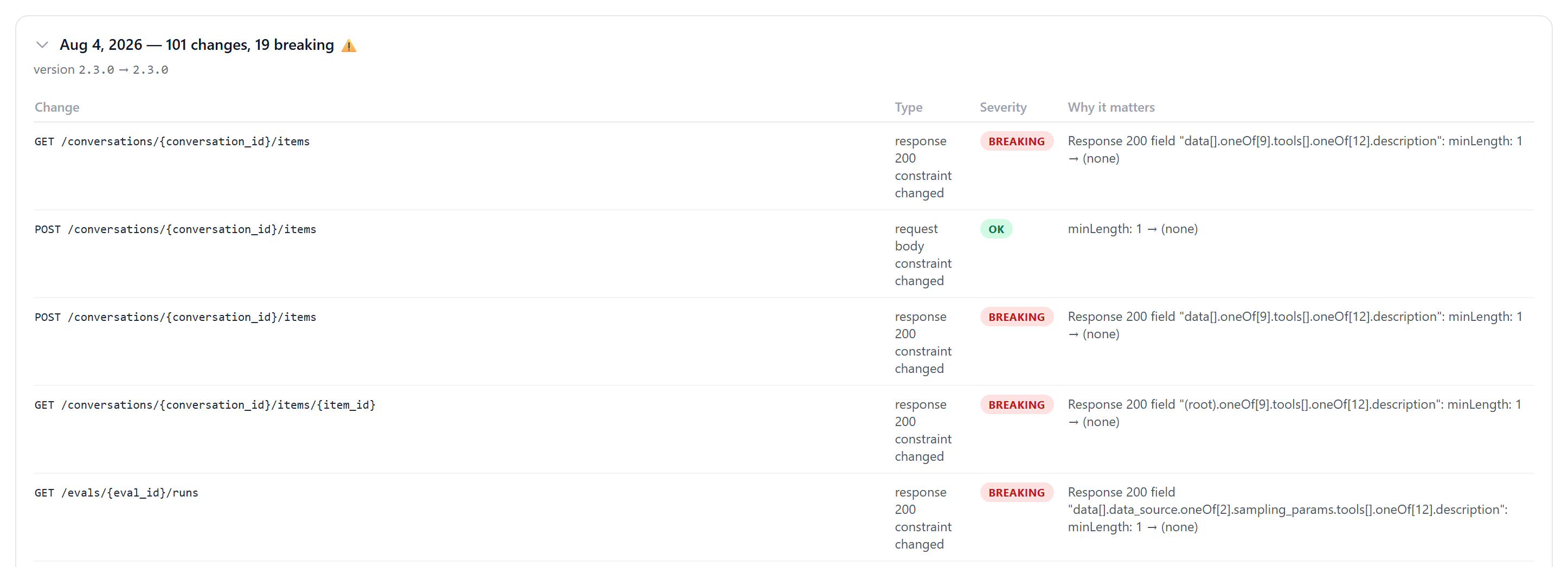
Note what these particular breaking rows are: response schema constraints changing on endpoints that were not mentioned in any announcement. That is the shape of the problem — not a version bump, not a migration guide, just a field that quietly stopped behaving the way your client assumed.
That middle tier is where most real incidents live, and it is exactly the tier that vendor release notes never mention. A new enum value is not a feature announcement to them; it is a Tuesday.
# Monitor an API in Under Two Minutes
The API Changelog Directory does the fetch-diff-classify loop for 50+ popular public APIs, rebuilding each changelog every day from the vendor's own OpenAPI specification. Here is the full workflow using the OpenAI API as the example.
# Step 1: Find the API You Depend On
Open the changelog directory and search for the vendor, or filter by category — AI, Fintech, Messaging, Payment, Cloud, Storage and others. Each card shows the category, when that API last changed, whether the latest change was breaking, and how many changes have been tracked.
Scanning the grid is itself informative: it is immediately obvious which of your dependencies changes weekly and which has been quiet for months.
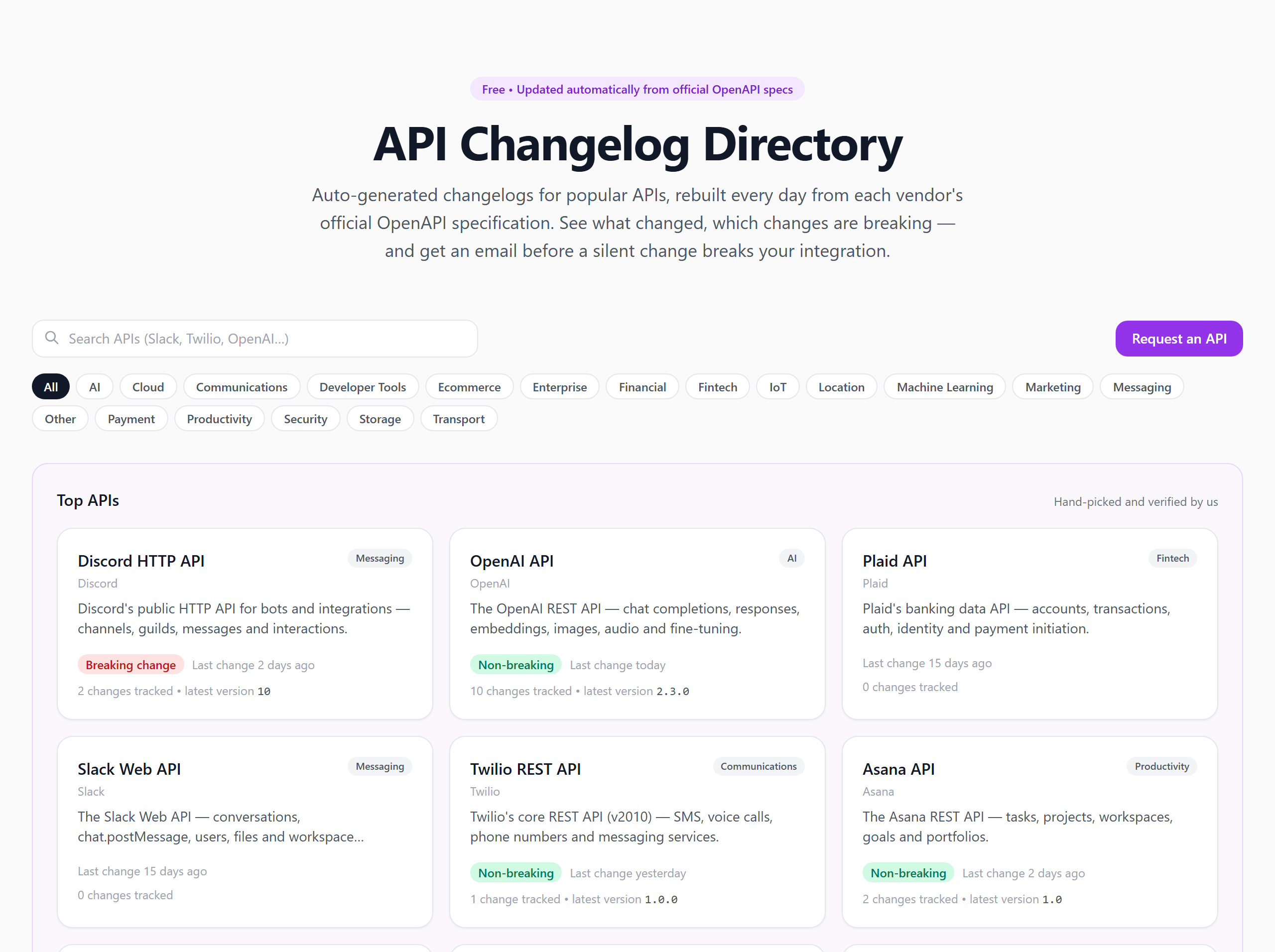
If the API you depend on is not listed, use the Request an API button. Anything that publishes a public OpenAPI spec can be added.
# Step 2: Read the Change History
Open the API's page — for this example, the OpenAI API changelog. Every entry is a real diff between two published versions of the spec, not a summary someone wrote. An entry looks like:
Aug 12, 2026 — 5 changes, none breaking version
2.3.0→2.3.0
Note the version numbers being identical there. That is the whole argument for spec monitoring in one line: the vendor shipped five contract changes without incrementing anything you could have watched for. A semver check would have seen nothing.
Expanding an entry gives you a table of every individual change with four columns — the affected endpoint or schema, the type of change (enum values added, property added), a severity label (OK, Potential, Breaking), and a plain-English "why it matters" explaining the consumer impact.
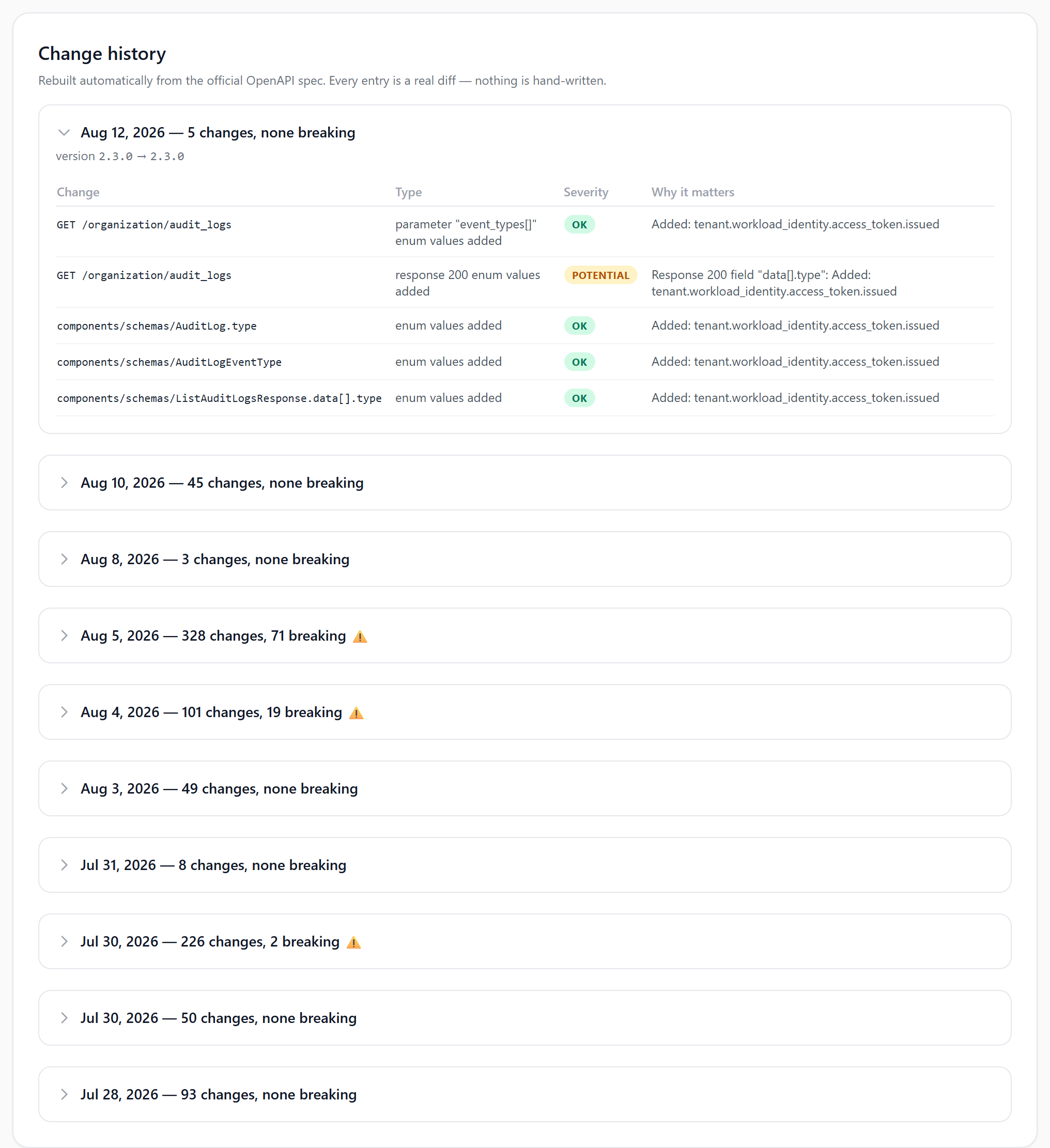
Scroll the history and you get something no vendor changelog gives you: an honest change-frequency profile for a dependency. If an API has a breaking change every six weeks, that is a fact worth knowing before you build a core feature on it — and worth putting in front of whoever is choosing between two vendors.
# Step 3: Turn On Email Alerts
On the API's page there is a box headed "Get emailed when OpenAI API changes." Enter your address and you are subscribed: an email on every change to that spec, breaking ones first. It is free, no account required, and one click to unsubscribe.
The alert arrives when the spec changes — which is typically before the vendor's own blog post, and reliably before the change reaches your error tracker.
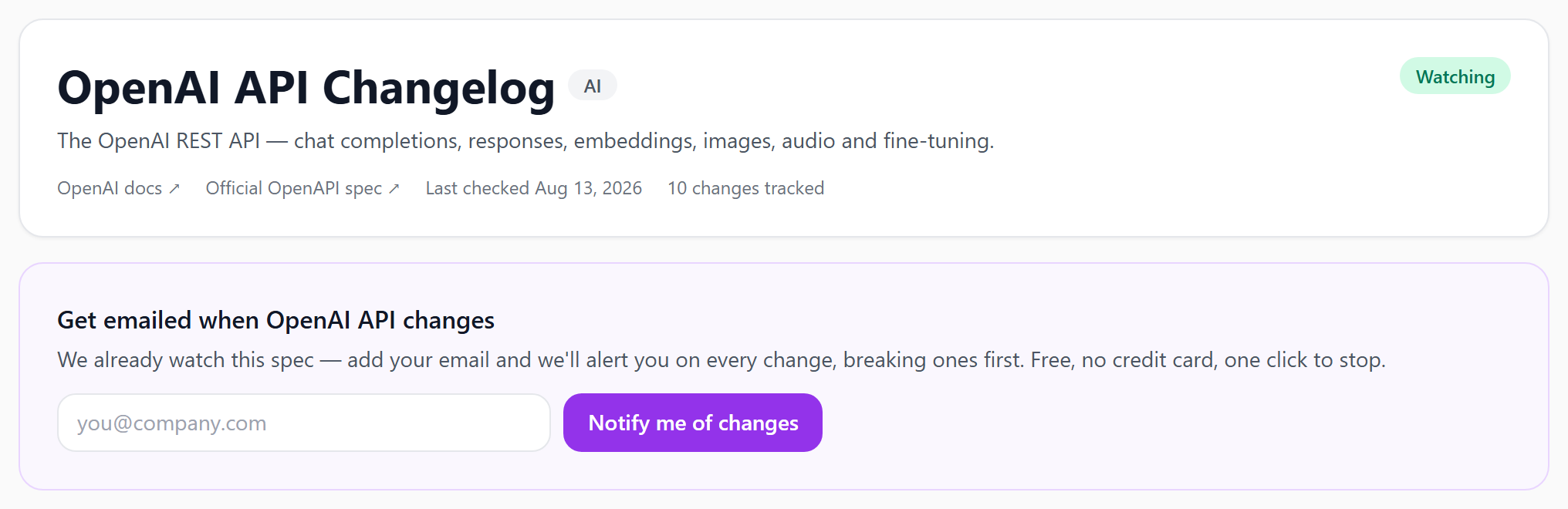
Repeat for each third-party API you depend on. A realistic setup for most teams is five to ten subscriptions, done once, pointed at a shared team alias rather than one engineer's inbox.
# Step 4: Triage the Alert
An alert is not an incident. The point of monitoring is to make the decision cheap, and the decision takes about two minutes:
- Does the change touch an endpoint you call? Most will not. Close it.
- If it does, what tier is it? Breaking means schedule work now. Potential means check your client code for the specific pattern — the exhaustive
switch, the strict length validation. - Is there a deprecation window? If a field is newly marked deprecated, you have time; put it in the backlog with the vendor's stated removal date, not "someday".
- Write it down. A one-line note in your integration's README about which version you validated against turns the next alert into a diff instead of an investigation.
The teams that get value out of this are the ones who route the alerts somewhere with an owner. An alert nobody is responsible for is the same as no alert.
# What About APIs That Do Not Publish a Spec?
Some vendors still ship documentation as HTML only. Options, roughly in order of effort:
- Check whether an unofficial spec exists. Many popular APIs have a community-maintained OpenAPI definition that tracks the real thing closely.
- Generate one from your own traffic. If you already have request/response examples — cURL commands, a Postman collection, HAR captures — you can turn them into a spec with cURL to OpenAPI and use that as a baseline to diff against.
- Fall back to contract tests. For a closed API with no spec, a nightly test hitting the handful of endpoints you actually use is the practical substitute.
- Weigh it at procurement time. "Do you publish a machine-readable spec?" is a fair question to ask a vendor before you integrate. Increasingly the answer says a lot about how they will treat your integration later.
# The Other Side: Your Consumers Have This Problem Too
Everything above describes you as the consumer. If you publish an API, your customers are running exactly this playbook against you — or worse, they are not, and they will find out from their users.
The same engine that builds the directory runs on your own specs. Upload a new version to ApiNotes and it diffs it against the previous one, classifies the changes, and publishes a dated changelog alongside your docs automatically. Related pieces if you want the full loop:
- OpenAPI Diff — compare two spec versions before you release
- API Changelog Generator — turn a diff into readable release notes and a
CHANGELOG.md - OpenAPI GitHub Action — run validation and diff on every pull request, and block merges that introduce breaking changes
Publishing a machine-readable spec and a real changelog is the single cheapest thing you can do to stop being the vendor in the first paragraph of this article.
# Comparing the Options
| Approach | Catches undocumented changes | Alerts before impact | Setup effort | Scales to 10+ APIs | Tradeoffs |
|---|---|---|---|---|---|
| Changelog directory + email alerts | ✅ Yes | ✅ Yes | None — one email per API | ✅ Yes | Requires the vendor to publish an OpenAPI spec |
| Vendor changelog / RSS | ❌ No | ⚠️ Same-day at best | Low | ⚠️ Nobody reads them all | Only covers what the vendor decided to announce |
| Watching the spec repo on GitHub | ✅ Yes | ✅ Yes | Low | ❌ Noisy | Raw diffs, no breaking-change classification |
| Contract tests in CI | ✅ Yes | ⚠️ On your CI schedule | High | ⚠️ Per-endpoint maintenance | Only covers endpoints you wrote tests for |
| Error tracking / alerting in prod | ✅ Yes | ❌ After the fact | Already have it | ✅ Yes | By definition, users hit it first |
# Start Watching an API
Pick the third-party API you would least like to have break, and subscribe to it. It takes under a minute and there is nothing to install.
Browse the API Changelog Directory
Popular starting points: